
Configure the HUD
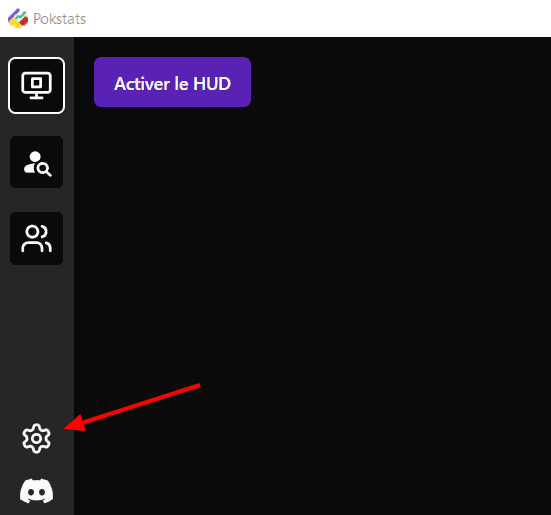
To use the Pokstats HUD, you need to complete a few setup steps first. To do this, open the room settings by clicking on the "Settings" icon in the sidebar:
You'll arrive on this page, which will allow you to configure your HUD:
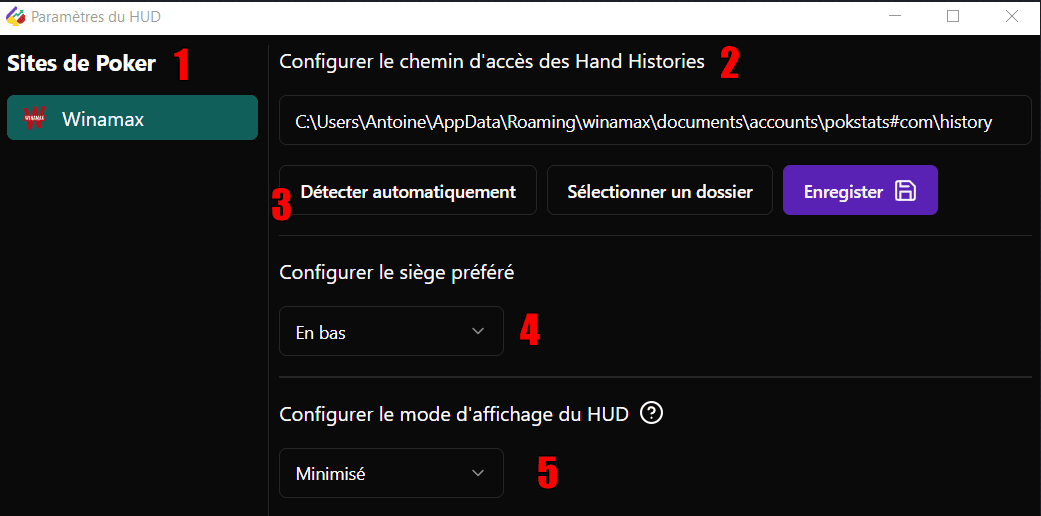
- Select the poker site you want to configure from the list on the left.
- Select the folder where the hand history files are saved. The HUD will not work without it.
- You can use automatic detection, which works in most cases. Otherwise, you can select the folder or enter it manually. Don't forget to save.
- Select your preferred seat. This must be the same as in the poker room's settings. This ensures the HUDs are displayed above the correct players.
Additional Info
- The HUD does not work with the Winamax Playground
- The HUD works only for MTTs
- The desktop application is available for Windows only